 The Objective
The Website History
This particular client specializes in delivering a variety of marketing services in several states across the U.S. As a relatively new business, the main challenge for them was to become an authoritative voice within their niche. Seeing as marketing is an industry flooded with all sorts of companies and agencies with varying levels of experience, our client needed to stand out from the crowd by projecting an image of true experts in their field.
The Issues
Building topical authority: the client was lacking supporting content for their landing pages, making them rank below its competitors due to a lower perceived authority. We tackled this issue by creating content that established E-A-T and catered to user intent when looking up niche-related keywords.
Restructuring the website: our client’s site structure was not well-optimized, which made it difficult for visitors to easily navigate to the pages they were interested in. We improved their site structure and implemented structured data wherever it was needed.
Implementation of a link building strategy: High-quality, helpful content is only part of what’s needed to build authority in one’s niche. Link building is another crucial aspect of authoritativeness. It shows search engines (and users) that the site is being linked to by other websites that are relevant to their niche, thus showing that it is being held in high regard by other professionals within the marketing industry.
Course Of Action
Content Strategy
The main focus of our campaign was the content published on our client’s website. As a new business in the marketing niche, the client struggled with a lack of topical authority with regard to the services provided by them.
Building Topical Authority
In order to establish authority within their niche, we created clusters of pages around the client’s main landing pages, packed supporting content that answered as many questions users may have had about a particular service or aspect of marketing as possible.
The very first thing to do when trying to establish topical authority is to identify the core topic that the cluster of supporting content is meant to be attached to. In the case of our client, these core topics pertained to the particular marketing services they were offering.
If you’re struggling to find core topics to explore on your own website, this can be easily done through Ahrefs’ “Keyword Explorer” tool.
Let’s say you operate within the gaming niche, and sell controllers for PCs. The first thing you want to do is look up a broad keyword pertaining to this niche. “PC controllers” will do well to illustrate this example.
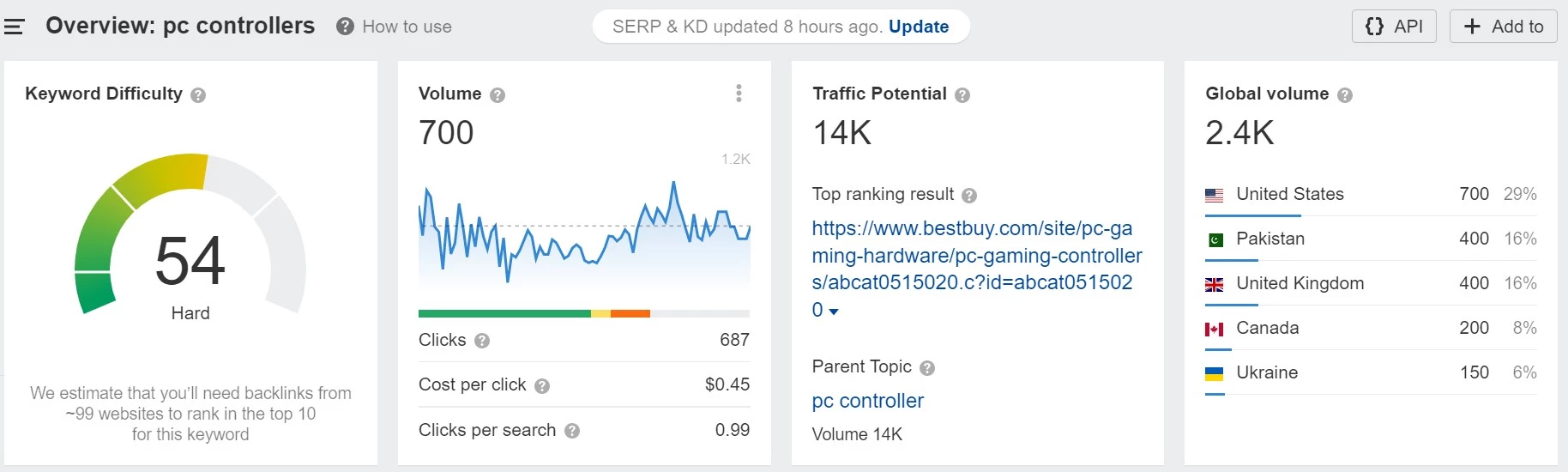
Once you look up the broad keyword, navigate to the “matching terms” section of the report to find a list of keywords containing your broad keyword. Here, you’ll want to focus on the “Parent Topic” section, which is where the topics you can explore as your core topics are laid out.

“Best controllers for PC” is the best core topic example on this list.
You can create a lengthy, comprehensive list that outlines and reviews the best options. For primary keywords for articles that support your core topic, you can see what terms your competitors focused on by scrolling down to the “SERP overview for ‘best controllers for pc’” and hitting on the keyword count of one of the highest ranking competitors.
You should see something like this:

“Wireless PC controller” is a good pick here – you can create a comprehensive supporting article focused on that primary keyword that answers a lot of doubts and questions your target audience may have about this specific type of controller.
Once you have a few ideas for supporting your core topic (we’d recommend around four supporting articles per core topic), you’ll need to insert contextual links to supporting articles into the core piece. This is a crucial step, as it establishes the connection between your core topic and its supporting articles.
User Intent
When planning out your new content, you’ll also need to make sure that your articles cater to the user intent, i.e. answers precisely what the visitors are looking for. There are four different types of user intent. We’ll stick with the PC controller example to illustrate them:
- Transactional: they want to buy something, like a new controller for their PC. Include transactional keywords, such as “buy,” “cheap,” “shop,” etc. to cater towards this intent.
- Informational: the searcher wants to learn more about a particular controller or a certain aspect of it. A good piece of informational content here would be: “How to Connect a Wireless Controller to Your PC.”
- Commercial Investigation: your potential visitor doesn’t want to spend their money just yet, but are rather researching the available options. Potential content ideas here would be: “top-rated PC controllers under $100,” “best wireless PC controllers,” etc.
- Navigational: they are looking for a particular brand or website. To best answer navigational queries, use keywords that mention a particular brand or service, ex. “Razer controllers.”
To identify user intent for your primary keywords, look at the top 10 ranked pages for this query, and ask yourself the following questions:
- What kind of content is on this page?
- What kind of page is it?
- How long is the content?
- Who created it?
- What is the purpose of this page?
On-Page Optimization
Carrying out an on-page inventory of your existing core landing pages will help you bring them up to the same standard as your new content and potentially improve their standing on SERPs. These are the three areas you should focus on:
- Page Title: it should be engaging and descriptive, include your target keyword as close to the beginning, and remain concise (no longer than 65 characters).
- H1 heading: similarly to the title, it should include the target keyword, as well as summarize the contents of your page.
- Meta Description: while it doesn’t affect your ranking, the meta description is an opportunity to give users a snippet of extra information about your page displayed on the SERP. Relevant terms and keywords people looked up can be displayed in bold by Google, which might attract additional visitors to your site.
E-A-T
E-A-T stands for Expertise-Authority-Trust, and is an important concept affecting nearly every website’s ranking on Google’s search engine results pages. Sites without E-A-T are considered not to bring any value to searchers and are therefore ranked lower.
This is especially important in the case of YMYL (Your Money/Your Life) pages, that can affect users’ physical or financial wellbeing. Below, we’ll break down each part of E-A-T, helping you understand how to establish it on your own website.
- Expertise: this indicates that the author of a page is an expert in their field. A good way to start establishing Expertise is by having detailed, comprehensive bios for each author that contributes to your website.
- Authority: the content displayed on your pages has Authority if it was published by a well-respected business with extensive experience in their field. Link building and supporting content are both methods of establishing Authority.
- Trust: your content can be trusted if it’s up-to-date and is backed up by reputable sources. Always check your new content’s relevance and credibility by correctly sourcing your claims and looking back on already-published pages to see if they can be updated.
Find out more about E-A-T via Google’s own guidelines, which you can find here.
Technical SEO Strategy
Site Structure
The technical SEO strategy for our marketing client was mainly built around their site structure. It determines how users and search engines navigate your website. A well-structured site is easily navigable, with all of its core content being reachable within three clicks (or less) from the homepage.
The number of clicks it takes to reach a particular page is called crawl depth. A crawl depth of 4 means that four clicks are required to reach a particular piece of content. If you find that your core pages are beyond the three-click limit, you should restructure your site to place them closer to the homepage. Pages beyond that limit are often omitted by search engine crawlers, as they’re deemed unimportant or irrelevant.
A logical site structure is important to web crawlers, and it should also be important to you if you want your core content to be ranked high on SERPs. Let’s say that your gaming controller-focused website contains three main sections: “Store,” “Reviews,” and “Blog.” Each one of these sections contain various sub-sections, such as product pages, individual reviews, and blog articles.
For your content to be crawled by search engines, your site should be structured like this:
-
Home
-
Store
-
Collection #1
- Product #1
- Product #2
-
Collection #2
- Product #1
- Product #2
-
Collection #3
- Product #1
- Product #2
-
Collection #1
-
Reviews
- Review #1
- Review #2
- Review #3
-
Blog
- Post #1
- Post #2
- Post #3
-
Store
Structured Data
In a nutshell, structured data (a.k.a. schema markups) is a piece of code that provides extra information to Google’s bots.
Implementing schema markups wherever possible makes your site eligible for rich results, i.e. being displayed in Featured Snippets or have product ratings visible as part of the search result of your page.
You don’t need to know how to code to implement structured data on your pages. There are plenty of tools that will do it for you, such as the Structured Data Markup Helper, created by Google themselves.
Link Building Strategy
Link building is one of the most important ranking factors for Google and other search engines. We helped our client improve their link profile by analyzing revamping the anchor text used for their links, as well as devising a new outreach strategy for obtaining high-quality backlinks.
Anchor Text Analysis
Simply put, the anchor text is the string of words that contain a hyperlink. The vast majority of our client’s anchor text was branded or URL-based, ex. “Razer controllers” or “www.example.com/blog-post.”
A varied distribution of anchor text ensures a healthier link profile. Consider using different types of anchor text for your links, such as:
- Branded anchor text: “The Search Initiative”
- Exact match anchor text: “SEO services”
- Partial match anchor text: “best SEO services”
- Generic anchor text: “click here”
- URL anchor text: “https://thesearchinitiative.com”
Outreach Strategy
Outreach is a crucial part of link building. It involves reaching out to other websites in your niche and asking them to link back to your content. The best way to do this is by creating high-quality, engaging content that other websites will want to link to.
Here are a few tips to help you get started with your outreach strategy:
- Find websites that are relevant to your niche and have a high domain authority. You can do this by using tools like Ahrefs or SEMRush.
- Reach out to the website owner or editor with a personalized email. Make sure to mention why you think your content would be a good fit for their site.
- Follow up with the website owner or editor if you don’t hear back after a few days. Be polite and persistent, but don’t be pushy.
- Track your outreach efforts and keep a record of which websites have linked back to your content. This will help you identify which strategies are working and which ones need to be adjusted.