 The Objective
The Website History
The client runs an eCommerce website offering plant supplies, such as planters and pots, to both residential and commercial clients in the United States.
The Issues
- Content. The client’s content wasn’t properly optimized for informational and commercial keywords, hampering its performance in SERPs.
- Navigation Issues. The online store already had a comprehensive range of category pages and subcategories. However, navigating the products was difficult due to the lack of proper filtering options.
- Lack of Structured Data. The website lacked structured data markup, making it harder to achieve higher click-through rates and secure visibility in Google's rich results.
To solve these pain points, we created a comprehensive SEO strategy that included thorough content optimization for informational and commercial keywords, improving the navigation, and implementing structured data.
Course Of Action
Optimizing For Micro-Moments
The recent surge in eCommerce SEO has made it more important than ever to know how to capture the key moments where you can put your website in front of your target audience. These crucial moments are referred to as “micro-moments.”
Optimizing For Micro-Moments
Micro-moments are those brief, intent-driven moments when users turn to their devices for quick answers, decisions, or actions. These typically fall into four categories: 'I want to know,' 'I want to go,' 'I want to do,' and 'I want to buy:'
- I-want-to-know moments. When a user has a question or needs information to make a decision, an example of this would be a query like “best earphones under $200”
- I-want-to-go-moments. Triggered by a desire to find a local business, for example, by searching “chinese restaurants near me”
- I-want-to-do-moments. When a user looks for instructions and guidance on how to solve their problem, searching for “how to sew”
- I-want-to-buy-moments. When a user is ready to make a purchase. A query example would be “vegan soap”
Why are Micro-moments Important for SEO?
Google prioritizes user intent, rewarding sites that deliver relevant, immediate answers. Optimizing content for micro-moments allowed us to:
- Create content more tailored to user intent;
- Improve visibility and diversity of the ranking keywords by creating content that addresses users at each stage of the SEO funnel;
- Increase conversion rates by ensuring content aligns with users’ immediate needs.
Optimizing for micro-moments allows you to better align with user needs. This results in better visibility, engagement, and higher conversions.
How to Capture Micro-moments
Capturing micro-moments includes five key steps:
- Understand your target audience. Identify your customers’ journey by recognizing key pain points and micro-moments they face. Search for relevant queries and keywords to find what people search for. You can use the Ahrefs Keyword Explorer Tool or People Also Ask here. Another potential strategy is to ask your customers directly for feedback.
- Create content for each micro-moment. Once you identify your users’ key moments, it’s time to create content that addresses each. Here’s a quick overview of content types that best work for every moment:
- I-want-to-do: blog posts, FAQ pages, guides;
- I-want-to-go: about pages, contact pages, Google Business Profile;
- I-want-to-do: how-to guides, video tutorials, product manuals;
- I-want-to-buy: product/service descriptions, category descriptions.
- Personalize the shopping experience. Learn how to use your customers’ actions and behaviors to personalize their experience in your eCommerce store. You can do that through tailored product recommendations, streamlining the checkout process, adding the guest checkout option, using only minimal form fields (and providing pre-filled forms), offering saved carts and wishlist options, and providing express checkout.
- Optimize for mobile devices. With smartphones taking over browsing and purchasing, optimizing your website for mobile devices is not just an option. It’s an absolute must. Ensure your website loads quickly, uses intuitive navigation and offers a seamless checkout process for users in the “I-want-to-buy” moment.
- Prepare for seasonality. Targeting seasonal keywords—queries that spike during specific times of the year - is a great way to attract users who are ready to take action. For instance, if you run an online gift shop, creating content focused on 'last-minute Christmas gifts' weeks before the holidays can capture high-intent shoppers during the festive rush.
Improving UX with Faceted Navigation
Faceted navigation is a system that allows users to refine search results by applying filters based on attributes like size, color, category, or price. While often associated with eCommerce, faceted navigation is also invaluable for content-heavy sites like travel portals or recipe databases.
- Example: A fashion website could let users filter by 'color,' 'size,' and 'material,' enabling visitors to quickly find the right product.
- How it works: Faceted navigation dynamically generates filtered pages by combining selected attributes. For example, selecting 'blue' + 'small' + 'cotton' refines the results into a highly specific list.

What to Consider Before Implementing Faceted Navigation
As great as faceted navigation is for user experience, it also presents several SEO issues. These, although solvable, must be taken into account when switching from your old navigation system to facets:
- Duplicate content issues. Each new facet combination generates a unique URL, potentially creating multiple pages with similar or identical content. This can dilute signals across duplicate pages, making it harder for Google to identify the canonical page.
- Index bloat. Google may index low-value faceted pages, leading to an inflated index with pages that offer little user value and harming how Google perceives your site overall.
- Crawl budget inefficiency. Faceted URLs can overwhelm Google’s crawlers, diverting resources from more critical pages. This is especially problematic for large sites with hundreds of categories or thousands of facet combinations.
How to Implement Faceted Navigation
Here are the steps to follow when implementing and optimising faceted navigation for user engagement:
Step 1: Use Platform-Specific Tools
How you implement the new navigation system will depend on your website’s CMS and setup:
- For WordPress: Use plugins like WP Grid Builder for interactive and fast filtering.
- For WooCommerce: Implement faceted search using tailored guides for better performance.
- For Shopify: Enable storefront filtering with platform-specific guides for seamless navigation.
Step 2: Use Buttons and Inputs for Links
Replace links with buttons and inputs to prevent unnecessary page reloads, creating a smoother experience.
Example:
- Button:
<button type='button'><span>Color</span></button> - Checkbox:
<label><input type='checkbox'><span>Blue</span></label>
Step 3: Add Canonical Tags
To prevent duplicate content issues, use canonical tags to point faceted pages to the original category page:
Example: <link rel='canonical' href='URL of the category page'>
Step 4: Allow Indexing of Important Faceted Pages
Add internal links from category pages to specific faceted pages that target high-traffic long-tail keywords. You can ensure proper indexing by:
- Using self-referential canonical tags.
- Avoiding 'noindex' or 'nofollow' meta tags.
- Removing disallow rules in robots.txt.
Step 5: Use AJAX for Dynamic Filtering
Implement AJAX to dynamically update content without reloading or creating crawlable faceted URLs, reducing duplicate content risks. Filters should instantly show relevant results, maintaining momentum and reducing drop-off rates.
Additional Tips & Best Practices for Implementing Faceted Navigation
- Keep it simple: Start with the most important filters and add others based on user behaviour to avoid overwhelming users.
- Prioritise key facets: Highlight crucial filters like Price or Brand while keeping less-used options collapsed.
- Use clear labels: Ensure filters have simple, descriptive names that users can easily understand.
- Maintain consistent terminology: Use uniform terms across categories to avoid confusion (e.g., 'Color' instead of switching to 'Shade').
- Enable flexible filtering: Allow users to combine multiple filters for more precise and personalised results.
Implementing Structured Data to Help Google Understand Content
The final part of our strategy involved implementing structured data to help Google understand content better and, as a result, enhance the client’s visibility in search results, through schema markup.
What is Schema Markup?
Schema markup is structured data added to your website’s HTML to help search engines understand your content better. It provides additional context, enabling features like rich snippets, which can enhance your visibility and click-through rates in search results.
Why is Schema Markup Important for SEO?
Although not a direct ranking factor, marking up your content with schema markup offers two key advantages to your content’s performance, namely:
- Improved SEO results. By using schema, you give search engines like Google clear information about your site, improving the chances of appearing in rich results such as product reviews, pricing, and availability. This boosts visibility, attracts more qualified traffic, and improves user experience.
- More clicks. Schema markup provides context that allows search engines to classify your content. This results in better visibility and higher click-through rates, as Google uses this information to improve the appearance of the search results.
Essential Schema Markup for eCommerce
The first thing to know about using schema markup for eCommerce is that you should remember to use the JSON-LD Format. Why? Because Google recommends it.
JSON-LD is a JavaScript notation embedded in <script> tags within the <head> or <body> of your HTML.
And as for schema types to use for eCommerce, be sure you implement the following:
- Product Schema: Displays key properties of the product:
- name: Product name
- image: URL of product images
- description: Product description
- sku: Stock-keeping unit
- brand: Brand name
- offers: Price, currency, availability, and seller details
- AggregateRating Schema (optional): Displays average rating and review count in search results.
- Review Schema (optional): Highlights customer reviews, including author, review date, and rating.

- Offer Schema: Details promotional offers, price validity, and item condition.
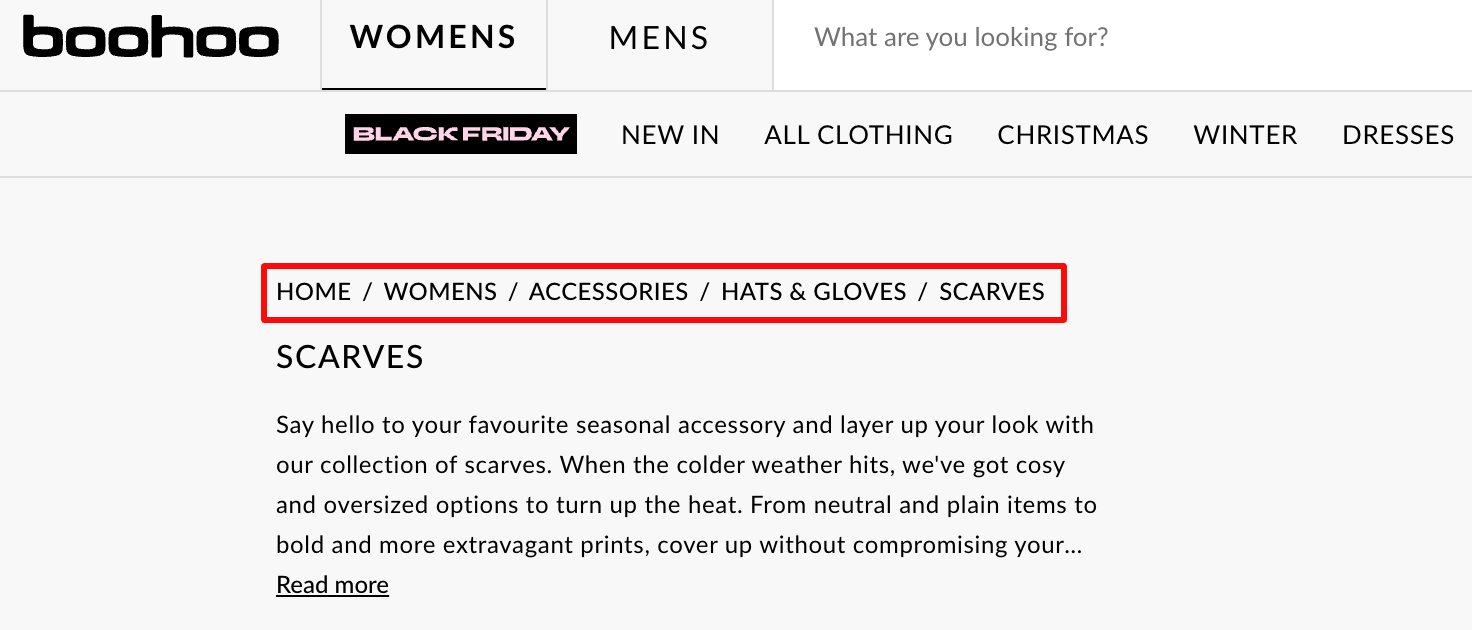
- BreadcrubList Schema: Helps users understand product categories and subcategories through contextual links displayed as a path:
- itemListElement: Array of breadcrumbs
- position: Breadcrumb order
- name: Breadcrumb label
- item: URL of each breadcrumb
Pro Tip: Remember to Validate Your Schema
Remember to validate your schema before adding it to your website to ensure accuracy and functionality.

Improper or incomplete markup can lead to errors that prevent your structured data from appearing in search results or, worse, mislead search engines and users.