 The Objective
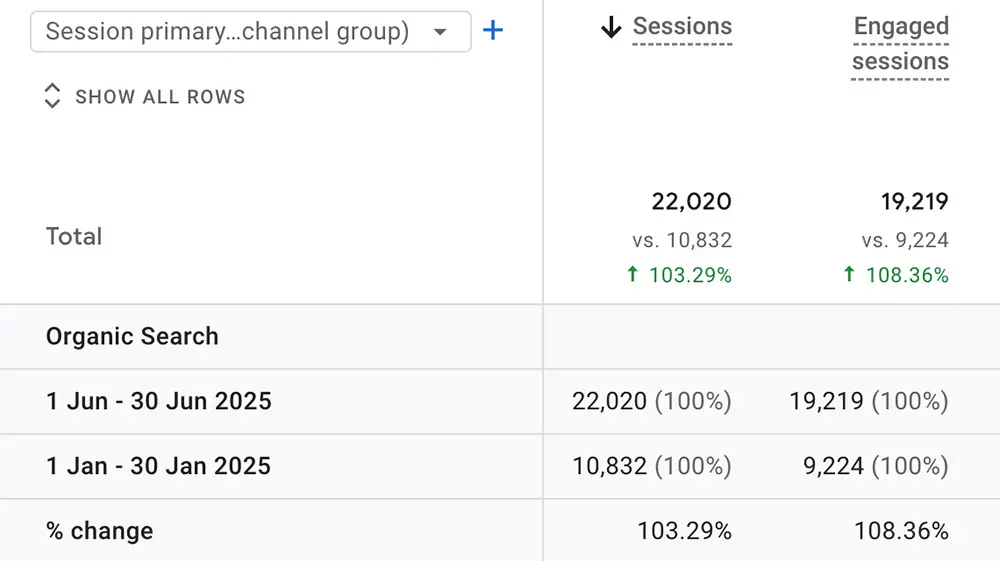
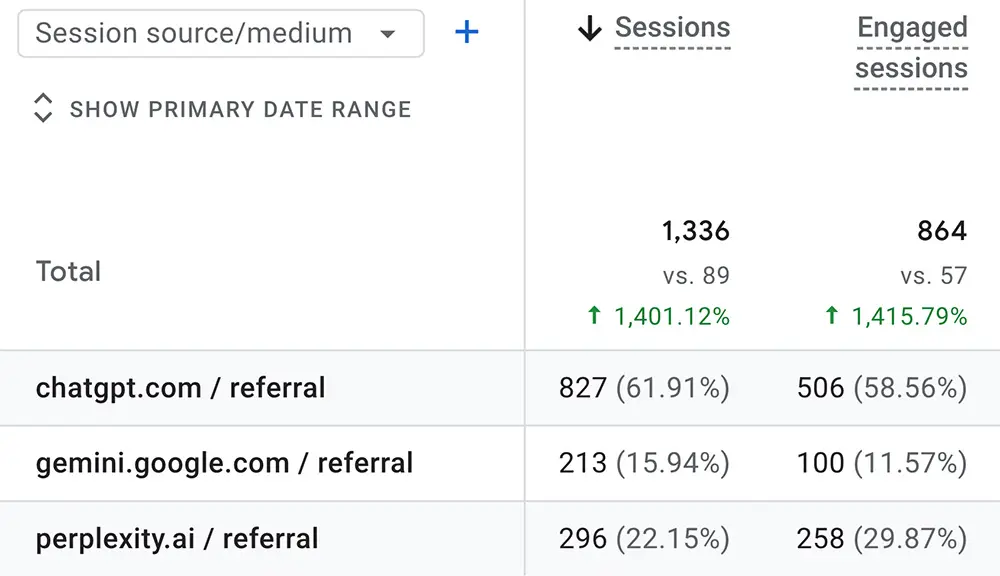
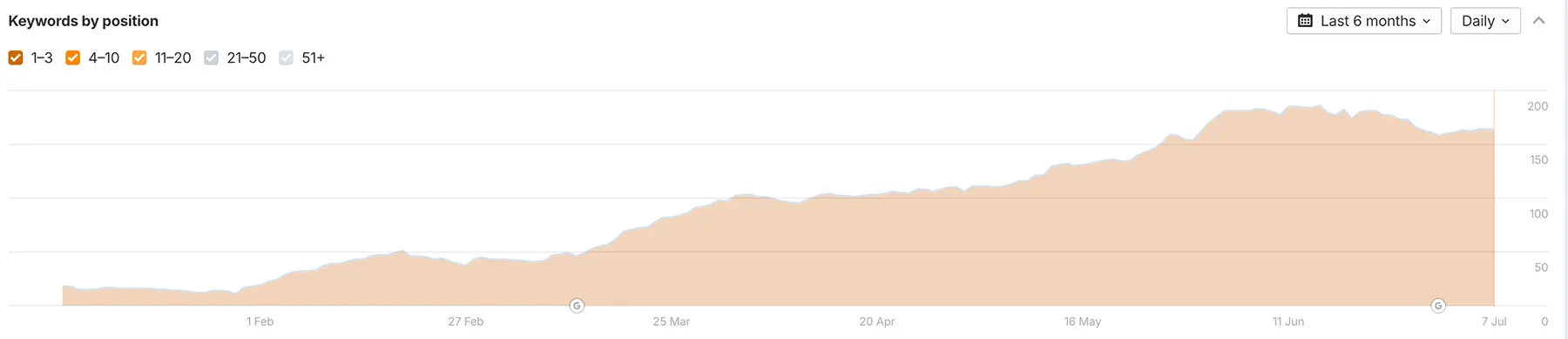
The objective of the campaign was to build on the client's strong organic search performance by expanding their visibility within AI-driven search environments. This included securing placements in Google's AI Overviews and increasing exposure across conversational platforms like ChatGPT and Gemini to prevent loss of market share and strengthen brand authority in emerging AI results.
The Website History
The client is a leading supplier of commercial plant products to businesses across the United States.
The Issues
- AI Search Visibility: Despite strong traditional SEO results, the client risked falling behind as AI search platforms like ChatGPT, Gemini, and Perplexity began reshaping how users discover content.
- Crawling Gaps: AI analysis of server logs revealed missed pages, gaps, and errors in how search platforms crawled the site.
- Content Interpretation: Without structured data like FAQ and Article schema, AI systems struggled to accurately interpret the content, reducing visibility in AI-generated results.
- Multimodal Content: The client's content lacked multimodal formats like images, videos, and tables, which limited its effectiveness in AI parsing and summarization.
Course Of Action
Below, you'll find a detailed breakdown of our strategy for this campaign.
Using Log Files to Improve Your Site's Visibility
With AI becoming a big part of how people search online, it's important to understand how search engines and AI bots explore your website. One valuable but often overlooked tool for this is your server log files.
What Are Server Log Files?
Server log files are simple text records created by your web server. They track every time a user or a search engine bot visits your site. These files include important information such as:
- Timestamps: The exact time when each visit happens.
- IP Addresses: Identifies where the visit is coming from.
- User-Agent Info: Shows which bots (like Googlebot or ChatGPT) are visiting your site.
- URLs and Status Codes: Lists the pages that were visited and their status (for example, a 404 error means the page is missing).
The Importance of Log Files for SEO
Log file analysis helps you:
- Identify which pages are crawled the most and least
- Ensure important content is being properly indexed
- Spot low-value pages that waste crawl budget
- Catch errors like 404s or broken redirects that block key pages
- Detect slow-loading pages that affect crawling efficiency
- Find orphan pages that may be overlooked by bots
- Monitor crawling patterns for unusual behavior that could indicate issues
How to Access Your Log Files
You can find your website's log files directly on your server. Most hosting providers, such as Hostinger or SiteGround, offer a file manager where these logs are stored.
To download your log files:
- Log in to your hosting control panel
- Open the "File Manager" or similar section
- Navigate to the folder labeled "logs," "access_logs," or something similar
- Download the log files you need to analyze
Once downloaded, you're ready to start reviewing your log files.
Using AI to Analyze Log Files for SEO Insights
Once you've downloaded your log files, AI tools like ChatGPT can help you gain valuable SEO insights. Here's how to make the most of your log data:
Upload Log Files: First, upload your log file to ChatGPT, and use this prompt:
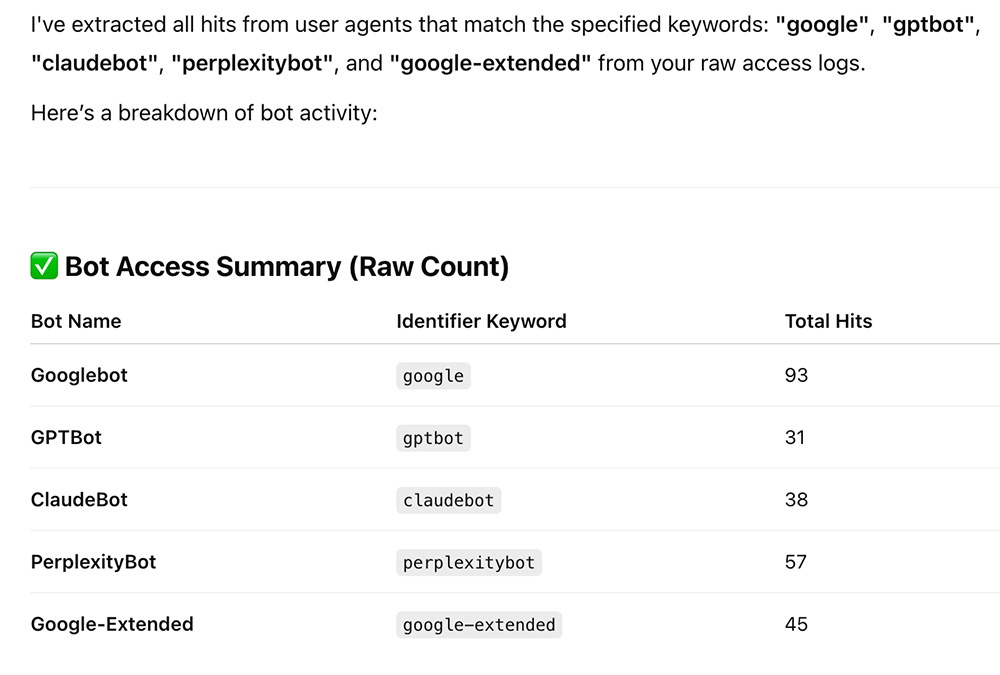
"I have attached raw access log files from my website's server. Please analyze the logs focusing on both Googlebot and AI crawlers such as GPTBot (ChatGPT), ClaudeBot, PerplexityBot, and Google-Extended (Gemini).
Identify all hits from user agents containing any of the following keywords: "google", "gptbot", "claudebot", "perplexitybot", or "google-extended".
Once you've analyzed this, I will ask you to perform a series of tasks."

You'll receive something like this:
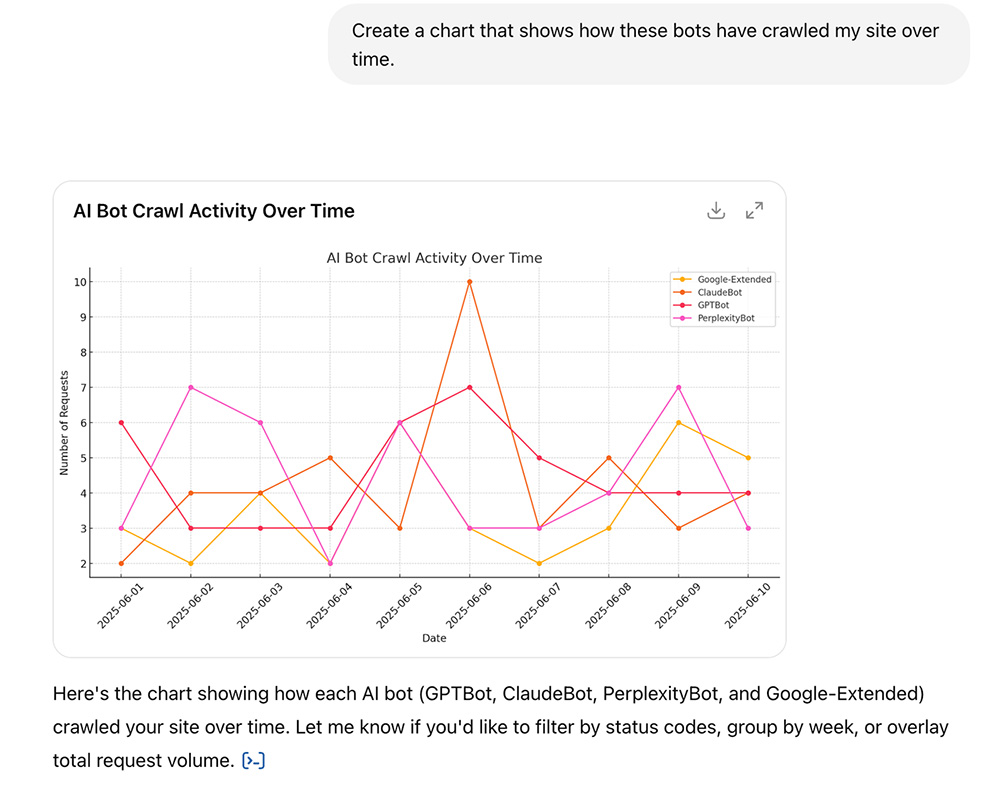
Create a Crawl Frequency Chart: Use this prompt to visualize how often these bots are crawling your site:
"Create a chart that shows how these bots have crawled my site over time."
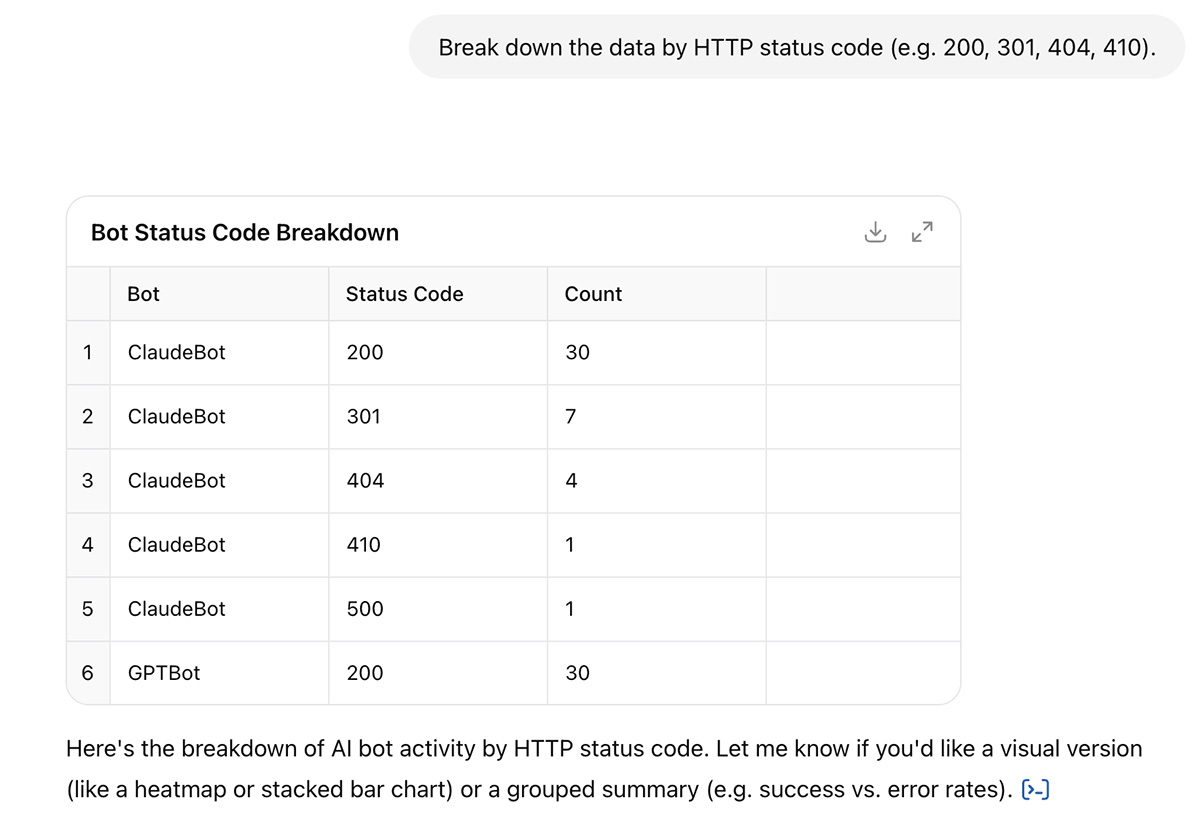
Analyze by HTTP Status Code: Break down the data by status codes (e.g., 200, 404) to see where errors may be hindering crawlers:
"Break down the data by HTTP status code (e.g. 200, 301, 404, 410)."
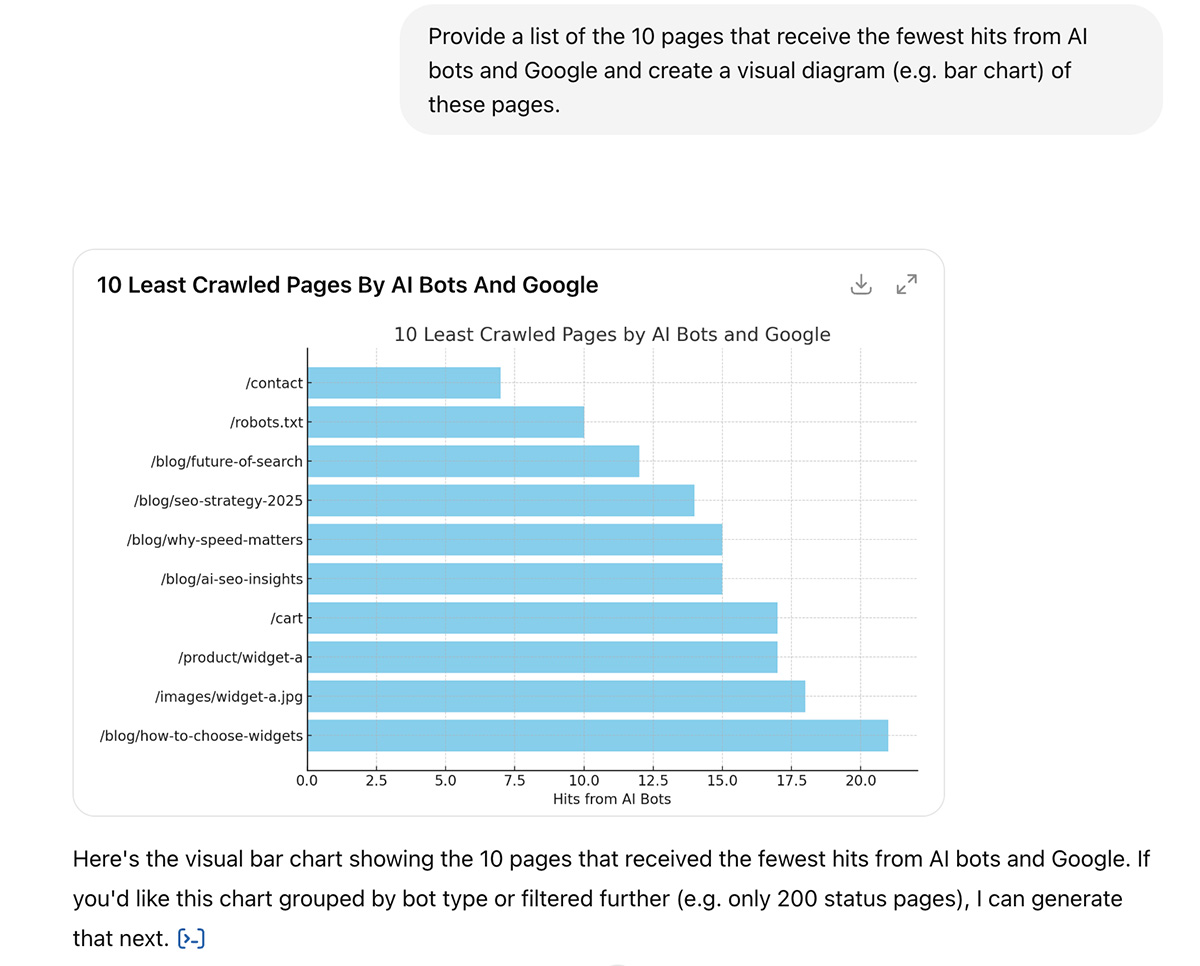
Identify Low-Traffic Pages: Find pages that receive the least attention from bots and AI:
"Provide a list of the 10 pages that receive the fewest hits from AI bots and Google and create a visual diagram (e.g. bar chart) of these pages."
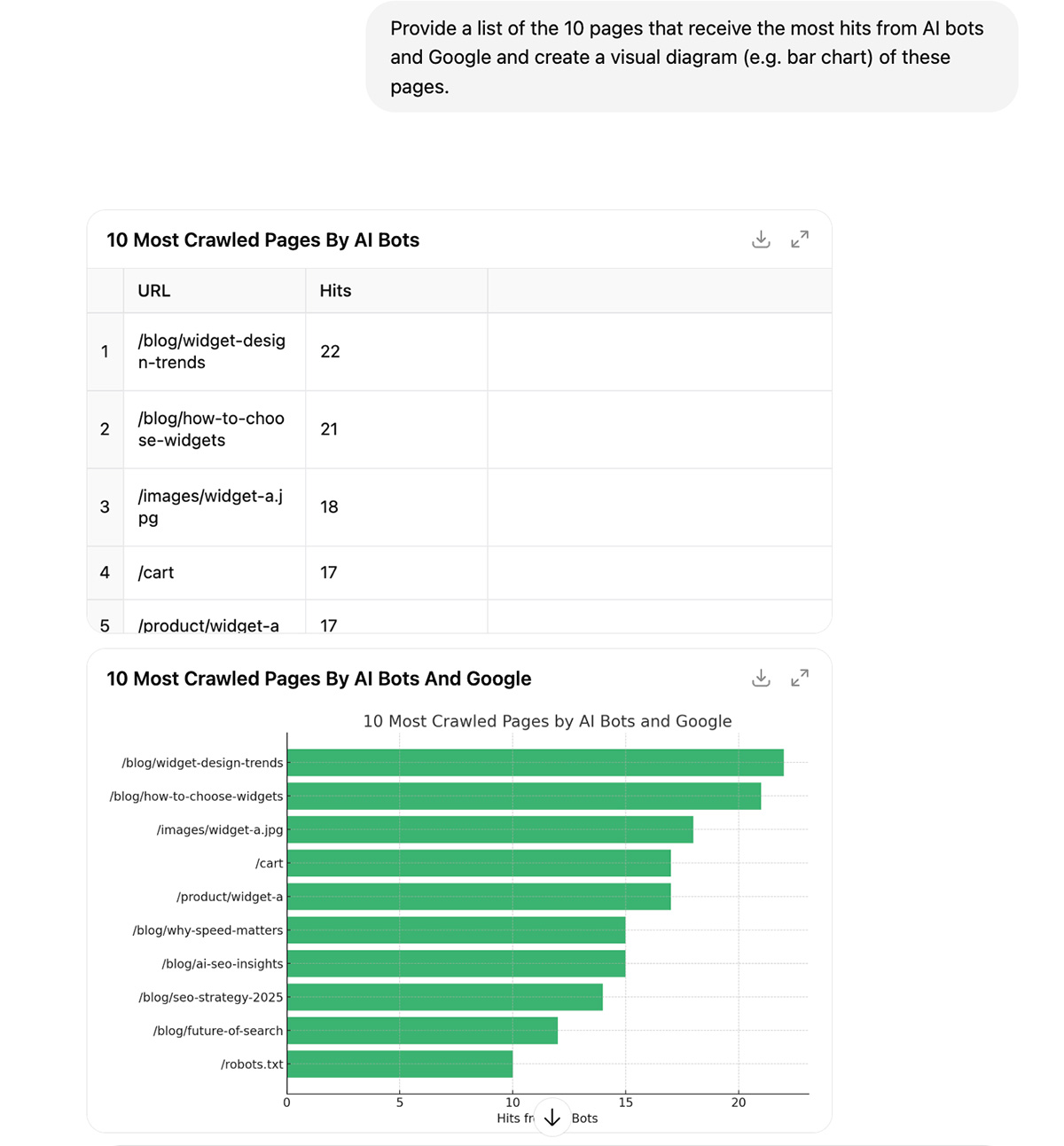
Identify High-Traffic Pages: Similarly, find the top 10 pages crawled most frequently:
"Provide a list of the 10 pages that receive the most hits from AI bots and Google and create a visual diagram (e.g. bar chart) of these pages."
Spot Crawl Errors: Detect any 4xx or 5xx errors that may be preventing bots from accessing important pages:
"Highlight any crawl errors from these bots (status codes 4xx and 5xx), and flag anything that looks unusual or worth fixing."

Analyze Patterns & Provide Insights: Lastly, analyze the data for any unusual patterns or missing pages:
"I have attached raw access log files from my website's server, Identify.
• Bots missing key commercial pages
• Pages being crawled unexpectedly often
• Sudden spikes in crawl activity"

Optimizing Content with Structured Data
While high-quality content is essential, technical strategies can also enhance how Google understands and ranks your site. One powerful method is using structured data (or schema markup) to provide clearer context about your content.
Understanding Structured Data
Structured data, or schema markup, is a code added to your pages to help search engines and AI systems better understand your content. It follows a standard format that makes it easier to categorize and display information.
Why Structured Data Matters for AI Search Visibility
Structured data doesn't directly impact rankings, but it plays a crucial role in improving how your pages perform in both traditional and AI-driven search results.
How? It helps Google better understand your content by clearly identifying the type of page, such as an article, product, event, or FAQ. This makes it more likely to show your content for relevant queries.
Key Types of Structured Data
Structured data can be added using formats like Microdata, RDFa, or JSON-LD.
Google recommends using JSON-LD, as it's easy to manage and scalable, and can be embedded directly within the <script> tag in the page's <head> or <body>.
Article Schema Markup
This schema is essential for blogs, news, and editorial pages. It improves indexing, eligibility for Top Stories, and AI summaries.
Main Properties:
- @type: "Article"
- headline: Title of the article
- image: URL of the feature image
- author: Name of the author
- datePublished & dateModified
- publisher: Name and logo of the publisher
Example Markup:
<script type="application/ld+json">
{
  "@context": "https://schema.org",
  "@type": "BlogPosting",
  "headline": "Top Tips for Structuring Your Content",
  "image": "https://example.com/images/blog-image.jpg",
  "author": {
    "@type": "Person",
    "name": "John Author"
  },
  "publisher": {
    "@type": "Organization",
    "name": "SEO Insights",
    "logo": {
      "@type": "ImageObject",
      "url": "https://example.com/logo.png"
    }
  },
  "datePublished": "2024-07-01",
  "dateModified": "2024-07-10",
  "mainEntityOfPage": "https://example.com/blog/schema-markup-guide"
}
</script>
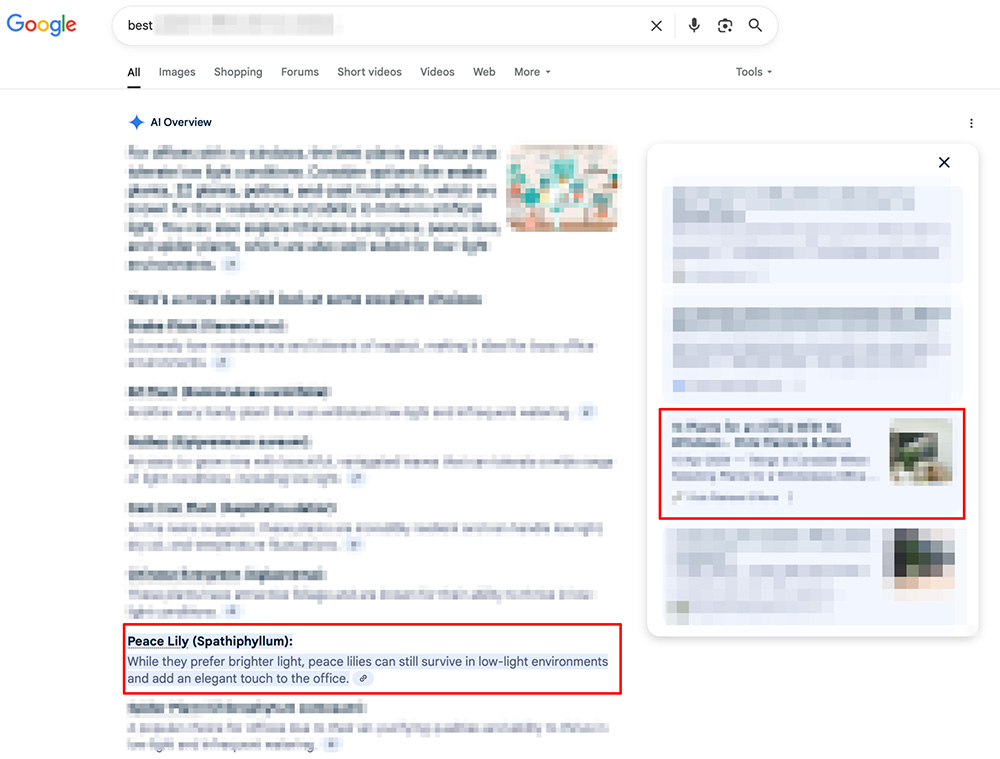
After implementing this, our client's page started ranking for 26 relevant keywords within Google's AI Overviews.

Here's an example of one such keyword, where the client's site was cited as a source in a specific section of the AI-generated response.
BlogPosting Schema Markup
This schema is tailored for blog content and improves visibility in AI-generated summaries, Google Discover, and Top Stories.
Main Properties:
- @context: "https://schema.org"
- @type: "BlogPosting"
- headline: Title of the blog post (under 110 characters)
- image: URL to an image representing the post (1200px wide for Discover)
- author: Name of the author
- publisher: Name of the publishing organization
- datePublished: Date of publication
- dateModified: (optional) Date of last update
- mainEntityOfPage: Canonical URL of the blog post
Example Markup:
<script type="application/ld+json">
{
  "@context": "https://schema.org",
  "@type": "BlogPosting",
  "headline": "Top Tips for Structuring Your Content",
  "image": "https://example.com/images/blog-image.jpg",
  "author": {
    "@type": "Person",
    "name": "John Author"
  },
  "publisher": {
    "@type": "Organization",
    "name": "SEO Insights",
    "logo": {
      "@type": "ImageObject",
      "url": "https://example.com/logo.png"
    }
  },
  "datePublished": "2024-07-01",
  "dateModified": "2024-07-10",
  "mainEntityOfPage": "https://example.com/blog/schema-markup-guide"
}
</script>
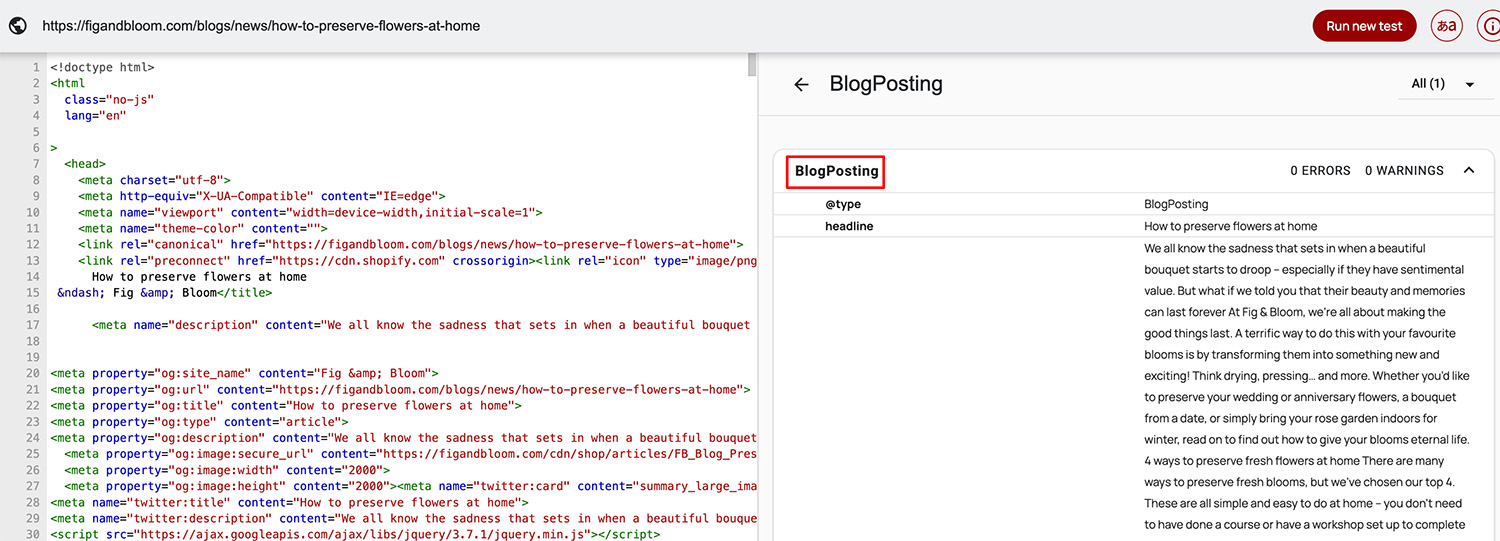
Here's what it looks like in action:
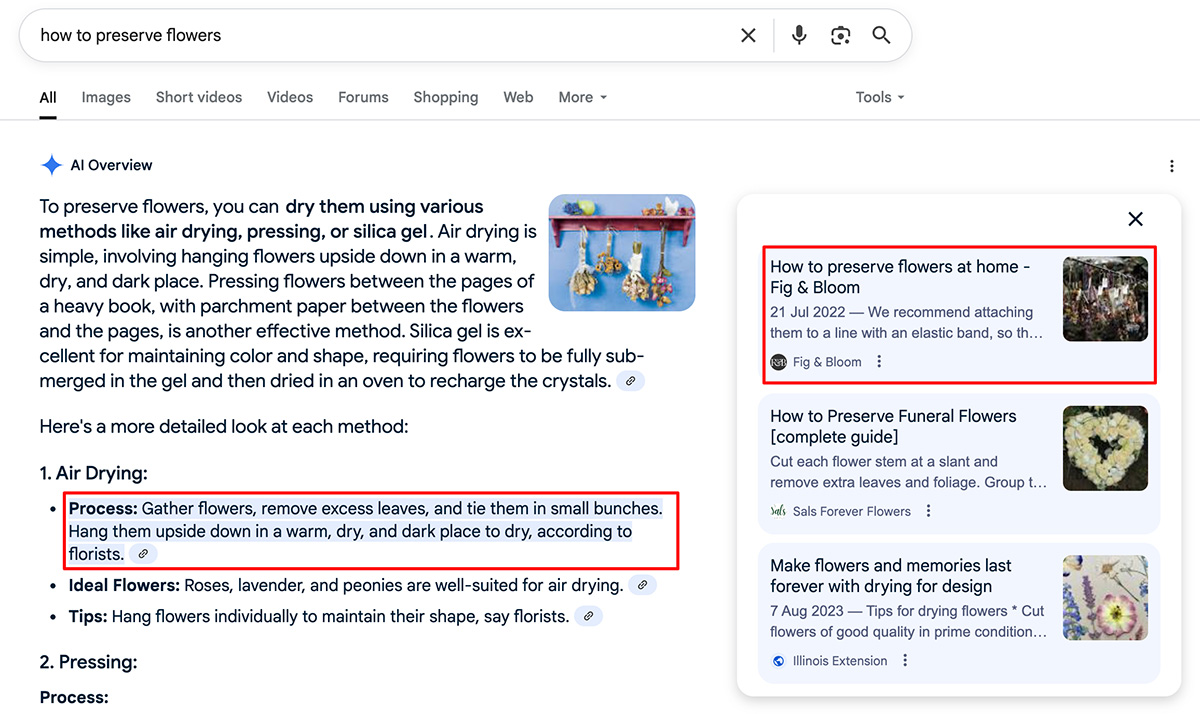
For this site, it's used as a source within Google's AI Overviews:
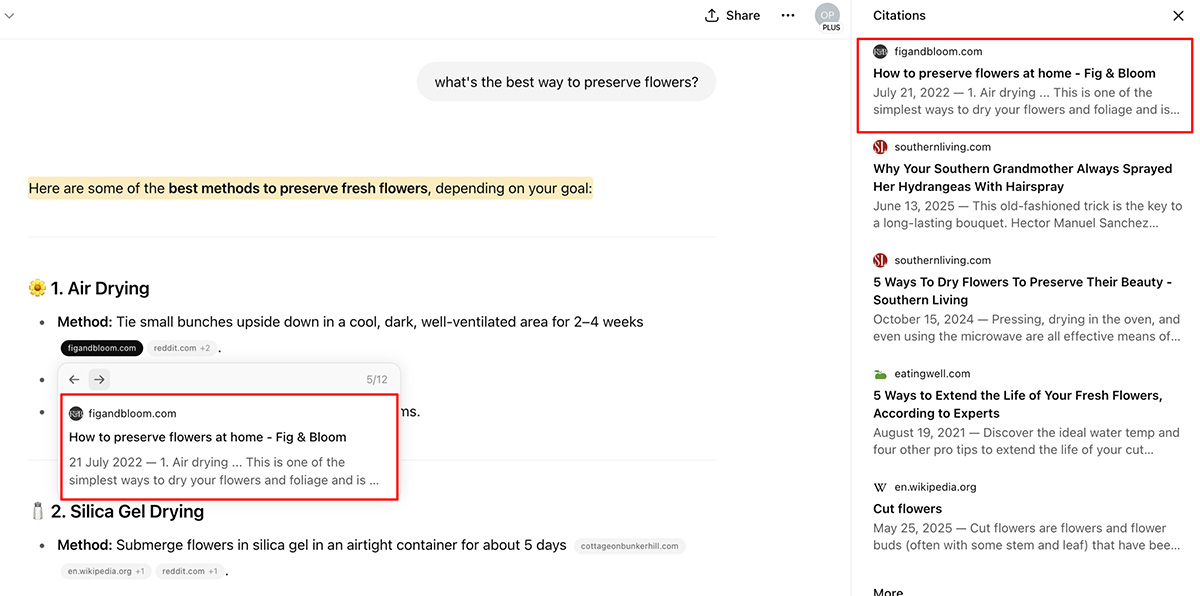
And ChatGPT too…
FAQPage Schema Markup
The FAQPage schema helps Google and AI systems recognize a page as containing a list of frequently asked questions and answers on a specific topic.
Main Properties Used:
- @context: Specifies the schema vocabulary. Value: "https://schema.org"
- @type: Declares the page as an FAQ. Value: "FAQPage"
- mainEntity: Contains a list of question-answer pairs. Each pair includes:
- @type: "Question"
- name: The question being asked
- acceptedAnswer: The answer provided with @type: "Answer" and text: The content of the answer
Example Markup:
<script type="application/ld+json">
{
  "@context": "https://schema.org",
  "@type": "FAQPage",
  "mainEntity": [
    {
      "@type": "Question",
      "name": "What is email marketing?",
      "acceptedAnswer": {
        "@type": "Answer",
        "text": "Email marketing is a digital marketing strategy that involves sending emails to prospects and customers to promote products, share updates, or build relationships."
      }
    },
    {
      "@type": "Question",
      "name": "What is a good open rate for email campaigns?",
      "acceptedAnswer": {
        "@type": "Answer",
        "text": "A good open rate varies by industry, but generally falls between 15% and 25%. Continually testing subject lines and optimizing send times can help improve your rate."
      }
    }
  ]
}
</script>
Here's an example of a page on the client's site with FAQPage markup:

… and the corresponding FAQs:

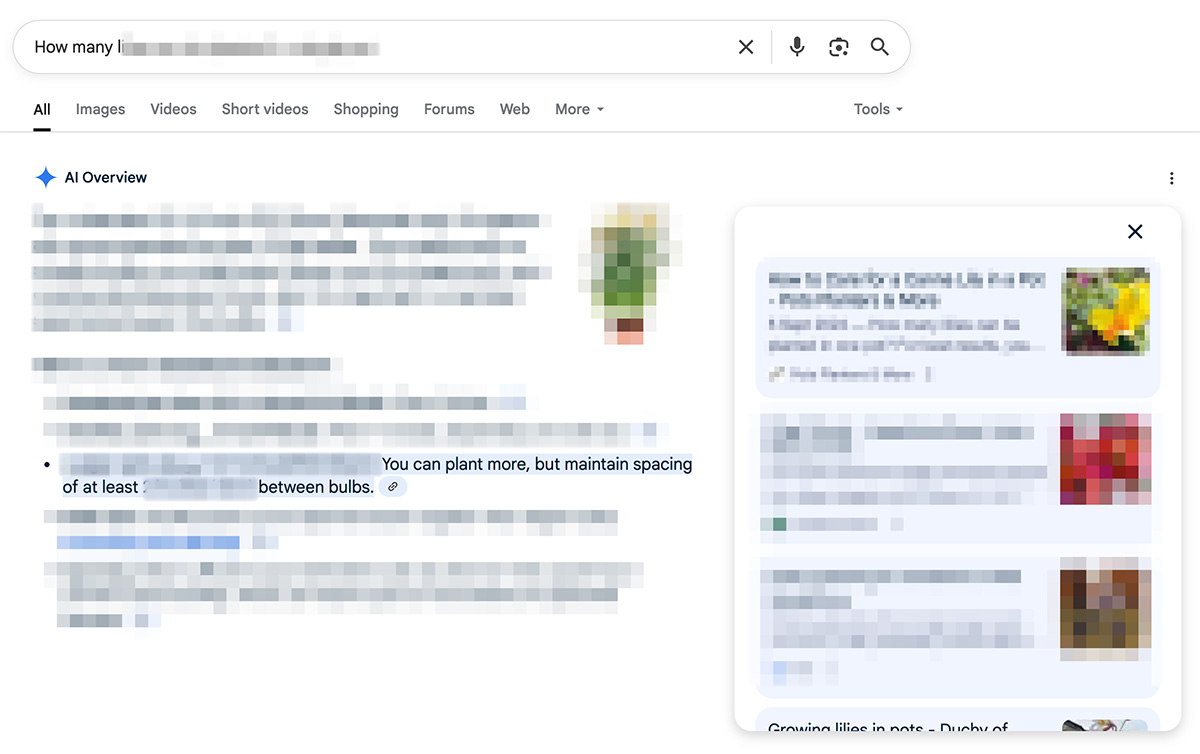
And here's how it's cited for that same FAQ in Google's AI Overviews:
Generating & Validating Structured Data with AI
AI tools can help generate and validate structured data to ensure it's correctly implemented on your site. You can quickly identify areas where schema markup is needed and automate the process of adding it to your pages.
Once your structured data is in place, it's important to validate it to ensure it meets Google's requirements. This can be done through tools like:
- Google's Rich Results Test
- Schema Markup Validator
For a more detailed breakdown on how we implemented these strategies, check out the full Advanced AI SEO Case Study.
Optimizing for Multimodal Content
AI search is no longer just about text. To ensure your content is featured in AI-driven results, you need to optimize for multimodal content, which is a mix of:
- text,
- images,
- videos,
- tables,
- and other formats.
Why Optimize for Multimodal Content?
- AI prefers scannable, rich content. Visuals like images and videos can better illustrate concepts than just text, making it more likely that your content will be featured.
- Structured content is key. Proper HTML markup (like <figure>, <table>, and alt text) helps AI systems easily understand and parse your content.
- Google recommends it. In May 2025, Google urged site owners to design with multimodal visibility in mind, emphasizing its importance for AI Mode.
How to Optimize for Multimodal Content
To ensure your content is visible in AI-generated summaries and rich search features, follow these best practices:
Use descriptive alt text: Alt text helps AI understand the context of images. Avoid generic descriptions.
- ✅ alt="Red-brick greenhouse door with ventilation panels"
- ❌ alt="greenhouse greenhouse greenhouse"
Choose clear file names: Use meaningful file names with hyphens to make them easy to read.
- ✅ commercial-plant-greenhouse.jpg
- ❌ IMG_1234.JPG
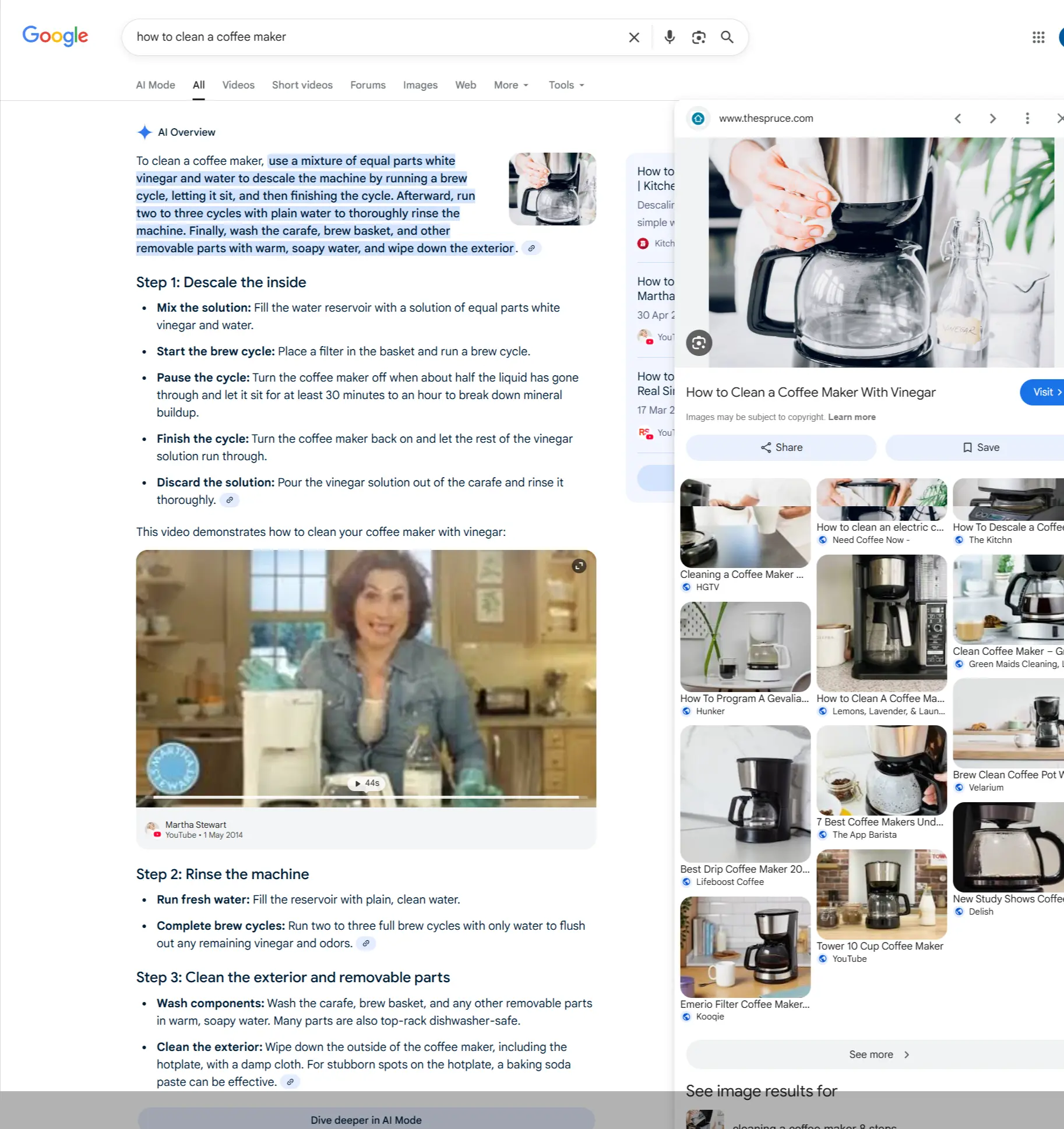
Add transcripts to videos: Transcripts make your video content indexable and more accessible. Adding a transcript also increases your chances of being cited by AI models, as seen in Google's AI Overview.
Use HTML tables, not images of tables: AI models can read data in HTML tables but can't interpret images of tables as easily.
✅
<table>
  <caption>Monthly plant supply shipments, Jan–Mar 2025</caption>
  <thead>
    <tr><th>Month</th><th>Shipments</th></tr>
  </thead>
  <tbody>
    <tr><td>January</td><td>1,200</td></tr>
    <tr><td>February</td><td>1,350</td></tr>
    <tr><td>March</td><td>1,400</td></tr>
  </tbody>
</table>
❌ <img src="shipment-table.png" alt="Table of monthly shipments" />
Following these guidelines ensures your multimodal content is accessible to AI, boosting your chances of appearing in AI search results.